Redact court filings and client records without uploading them.
RedactPro finds Social Security numbers, account numbers, birth dates and names in PDF and Word files, and permanently removes them on your own computer. You review every item. Each file gets a signed certificate.
For Windows 10 and 11. Free during the public beta.
UNITED STATES DISTRICT COURT
DECLARATION OF DANIEL R. OKAFOR
1. My name is Daniel R. Okafor. My Social Security number is XXX-XX-4417. I was born on 1975.
2. I hold checking account XXXX-XXXX-3387, from which the payments in this case were made.
3. My daughter, A.O., is a minor and lives with me.
- Nothing uploadedEvery step runs on your computer.
- You review every itemNothing is removed until you confirm.
- Removed, not coveredIf a value can still be extracted, the file is not saved.
- A signed certificateOne for every file, with both file hashes.
How it works
-
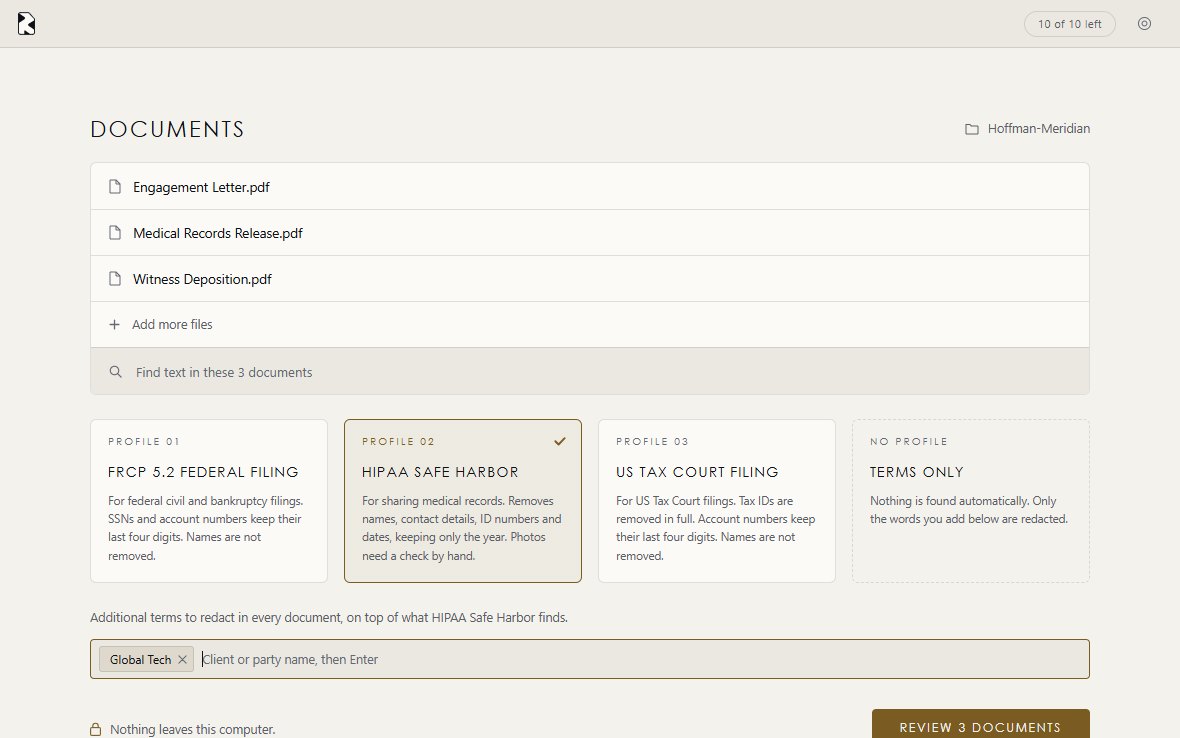
Step 1
Choose the rule you are working under
Add a folder of PDFs or Word files and pick a profile. Add any client or party name that must be removed wherever it appears.
-
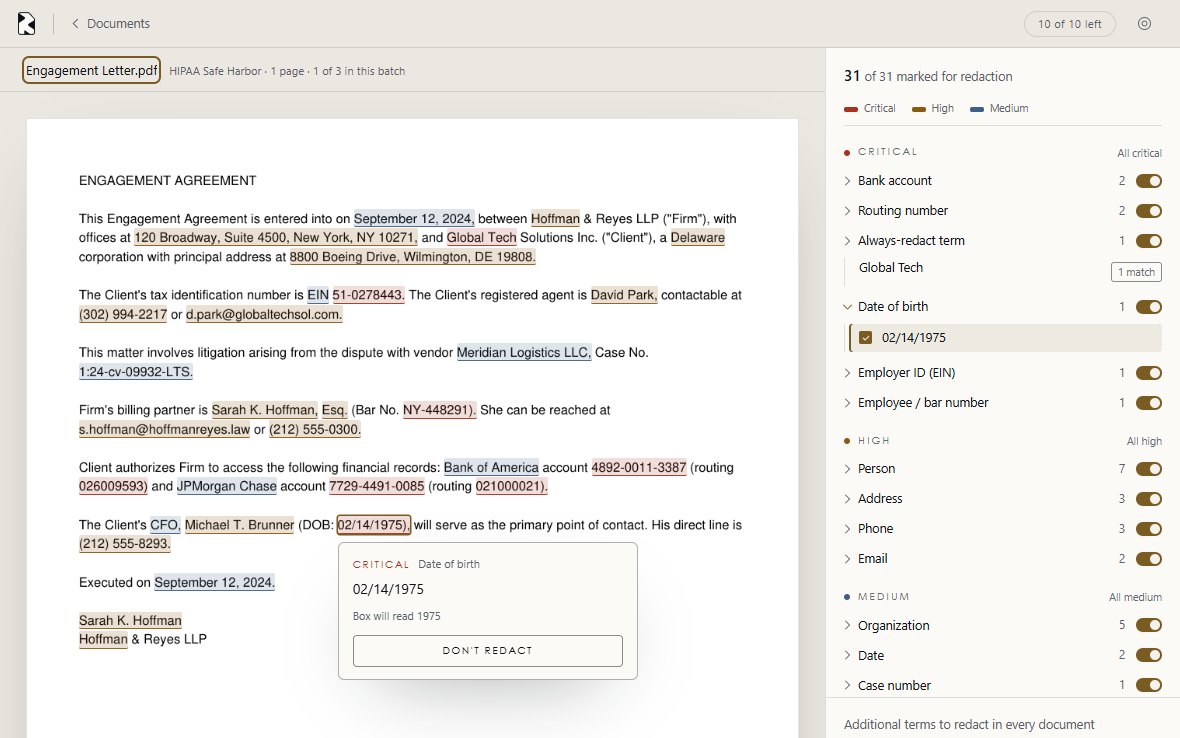
Step 2
Review everything it found
Each item is marked on the page and listed by type and severity. Select one to see exactly what its box will read, or leave it as written.
-
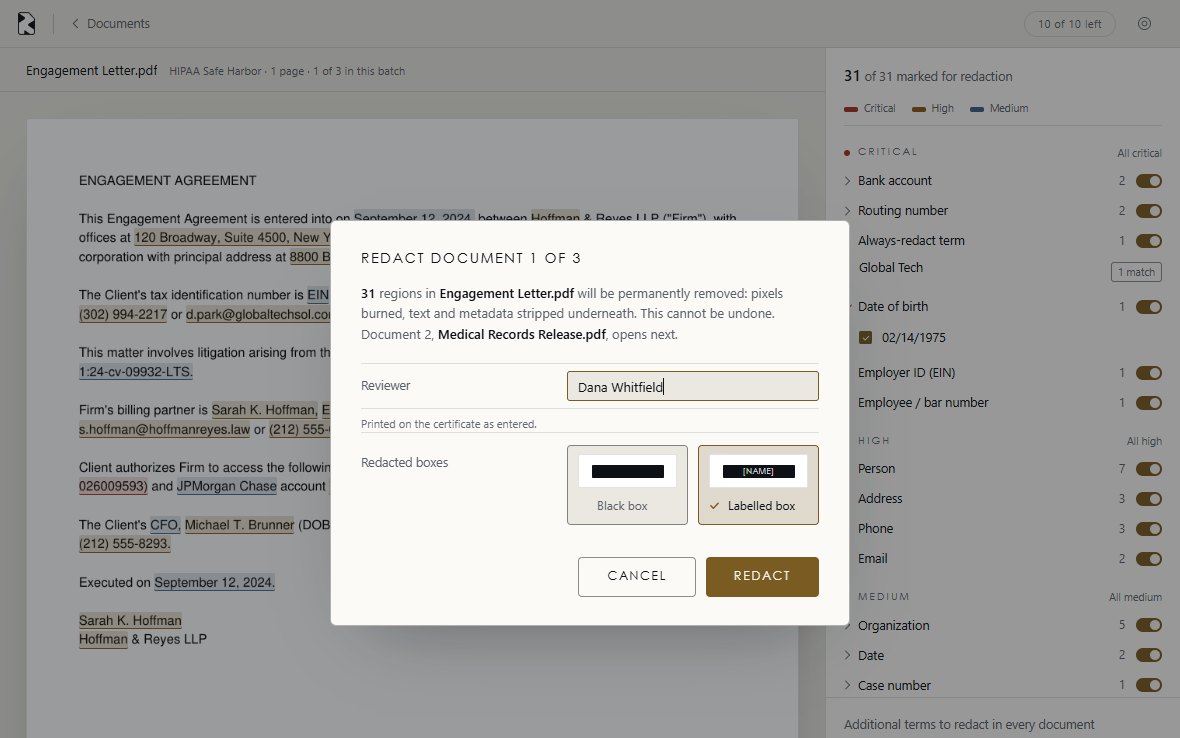
Step 3
Remove it permanently
Enter the reviewer's name and confirm. The page image, text and metadata under each box are removed. Then RedactPro checks its own output, and if a value can still be extracted, it refuses to save the file.
-
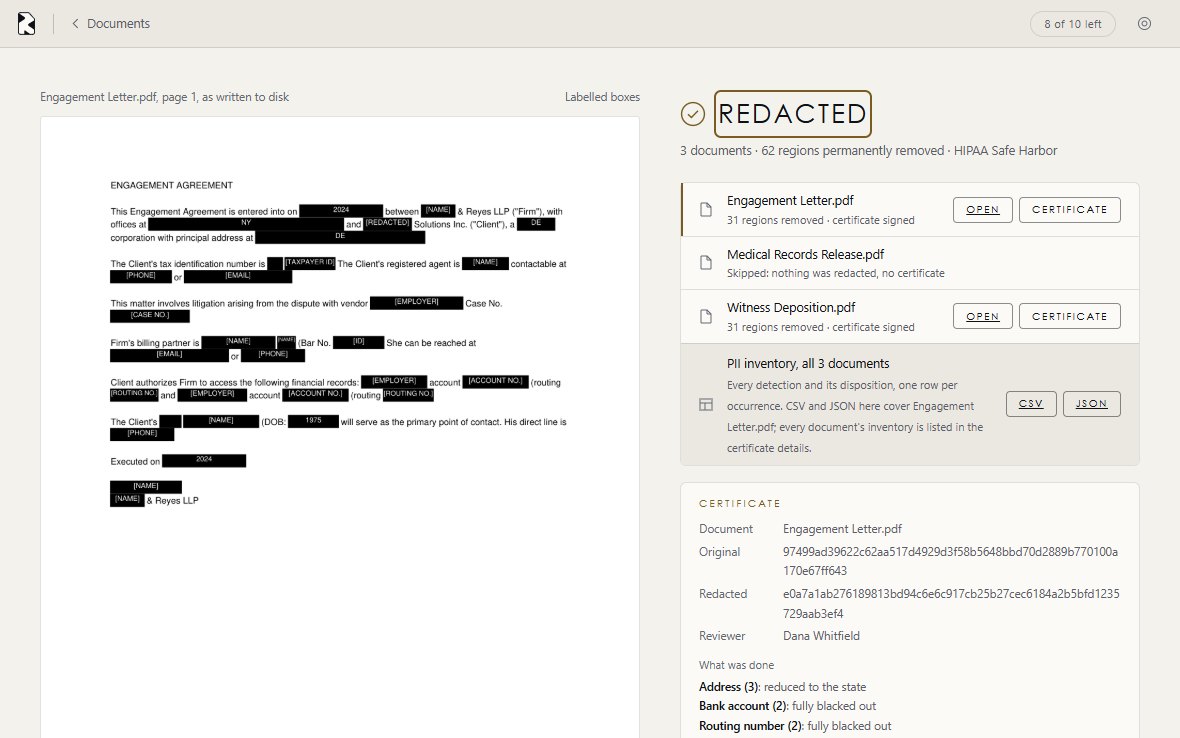
Step 4
Keep the certificate with the file
You get the redacted file, a certificate, and an inventory of every item in CSV or JSON. Your original is not changed.
Why a black box is not enough
A PDF keeps the same words in more than one place. A box drawn on top hides the page, while the value can still be copied out from underneath. RedactPro removes it from every layer.
What each profile does
Each profile follows the published text of its rule, and each box below is what the redacted page shows. A fourth profile, Terms only, finds nothing automatically and removes only the words you list.
| Item | FRCP 5.2 Federal Filing Fed. R. Civ. P. 5.2(a) | HIPAA Safe Harbor 45 CFR 164.514(b)(2) | US Tax Court Filing Tax Court Rule 27(a) |
|---|---|---|---|
| Social Security number, ITIN | Last four digits | Removed | Removed |
| Employer ID number | Last four digits | Removed | Removed |
| Bank or card account | Last four digits | Removed | Last four digits |
| Date of birth | Year only | Year only, or "90 or older" | Year only |
| Name of a minor, marked by the reviewer | Initials | Removed | Initials |
| Other names | Your choice | Removed | Your choice |
| Street address | Your choice | State only | Your choice |
| Phone, email, web and IP addresses | Your choice | Removed | Your choice |
| Other ID, license and case numbers | Your choice | Removed | Your choice |
| Other dates | Your choice | Year only | Your choice |
"Your choice" means the item is marked in Review but stays in the document unless you select it. A plain black box can also carry a label such as [SSN]. If RedactPro cannot read a value well enough to apply the rule, it uses a full black box instead.
What the certificate records
One certificate per file, digitally signed by your copy of RedactPro. The signature and the file hashes let you show that a redacted file has not changed since it was produced.
Redaction certificate Sample
- Original file
- SHA-256 hash
9f2c 41ab…07de - Redacted file
- SHA-256 hash
c81e 6d30…b2f4 - Profile
- The rule applied: FRCP 5.2 Federal Filing
- Reviewer
- The name entered, as typed: Dana Whitfield
- What was done
- Count by type, and how each was treated
- Date and signature
- Timestamp and Ed25519 signature
What leaves your computer
Your documents and their text never do. RedactPro has no server to send them to, and it uses no cloud AI. Detection runs locally with open-source rules and a language library, so the same file gives the same result every time. The app also has no analytics or crash reporting. Read the privacy policy.
Your computer
Documents and their text: never sent
What RedactPro does not do
- It does not replace your review. No automatic tool finds everything. Names of companies and employers are the items most likely to need a person's eye.
- It does not make a record de-identified on its own. Safe Harbor also covers photographs, biometrics, device serial numbers and license plates, which it does not detect, and requires that you have no actual knowledge the rest could identify someone.
- It is not legal advice. You decide what a filing requires.
- It does not yet open spreadsheets or run on a Mac. PDF, including scanned PDF, and Word on Windows only.
Free during the public beta
No document limit and no card. After the beta, a free plan stays at 10 documents a month. Pro is $15 a month; Firm is $35 a month for five computers.